How to do Keyword Research for Google Ads?
If you've ever spent an afternoon buried in Google Ads trying to find the right keywords for a campaign, you know the drill. You open the Keyword Planner, get overwhelmed by a wall of suggestions that barely relate to your business, export a spreadsheet you'll never look at again, and somehow end up worse off than when you started.

Fillipa Team
Tools

It shouldn't be that hard. And honestly, it doesn't have to be.
We built the Keyword Research tool inside Fillipa because we were tired of watching agencies and freelancers waste hours on something that should take minutes. This article breaks down how keyword research actually works for Google Ads, why most people get it wrong, and how Fillipa makes the whole process faster and more intuitive.
What Keyword Research Really Means for Google Ads
Let's start with the basics, because there's a surprising amount of confusion here.
Keyword research for Google Ads isn't the same as keyword research for SEO. When you're running paid search campaigns, you're not just trying to rank organically for popular terms. You're bidding on words and phrases that real people type into Google right before they're ready to take action. That could mean buying something, signing up, or requesting a quote.
That means the stakes are different. Every keyword you add to a campaign costs money when someone clicks. Pick the wrong ones and you burn through your budget showing ads to people who were never going to convert. Pick the right ones and you get qualified traffic at a price that makes sense.
The problem is that finding those "right ones" has traditionally been a clunky, time consuming process.
Why Google Ads Keyword Planner Falls Short
Google's built in Keyword Planner is the default tool most advertisers start with. It works. But it's also designed to get you to spend more money on Google, not necessarily to help you build efficient campaigns.
Here's what tends to go wrong.
The suggestions are broad and often irrelevant. You search for "construction bridges" and get recommendations for "bridge card game." The interface buries the metrics that actually matter, like how keywords perform relative to each other within your existing campaign. And there's no easy way to see your current keyword performance alongside new opportunities.
For agencies managing multiple clients, this gets exponentially worse. You're switching between accounts, exporting CSVs, cross referencing data in separate tabs. It's a workflow built for 2012.
A Better Way to Find Keywords for Google Ads
This is where Fillipa's Keyword Research tool comes in, and honestly, this is the feature our users tell us changed how they work.
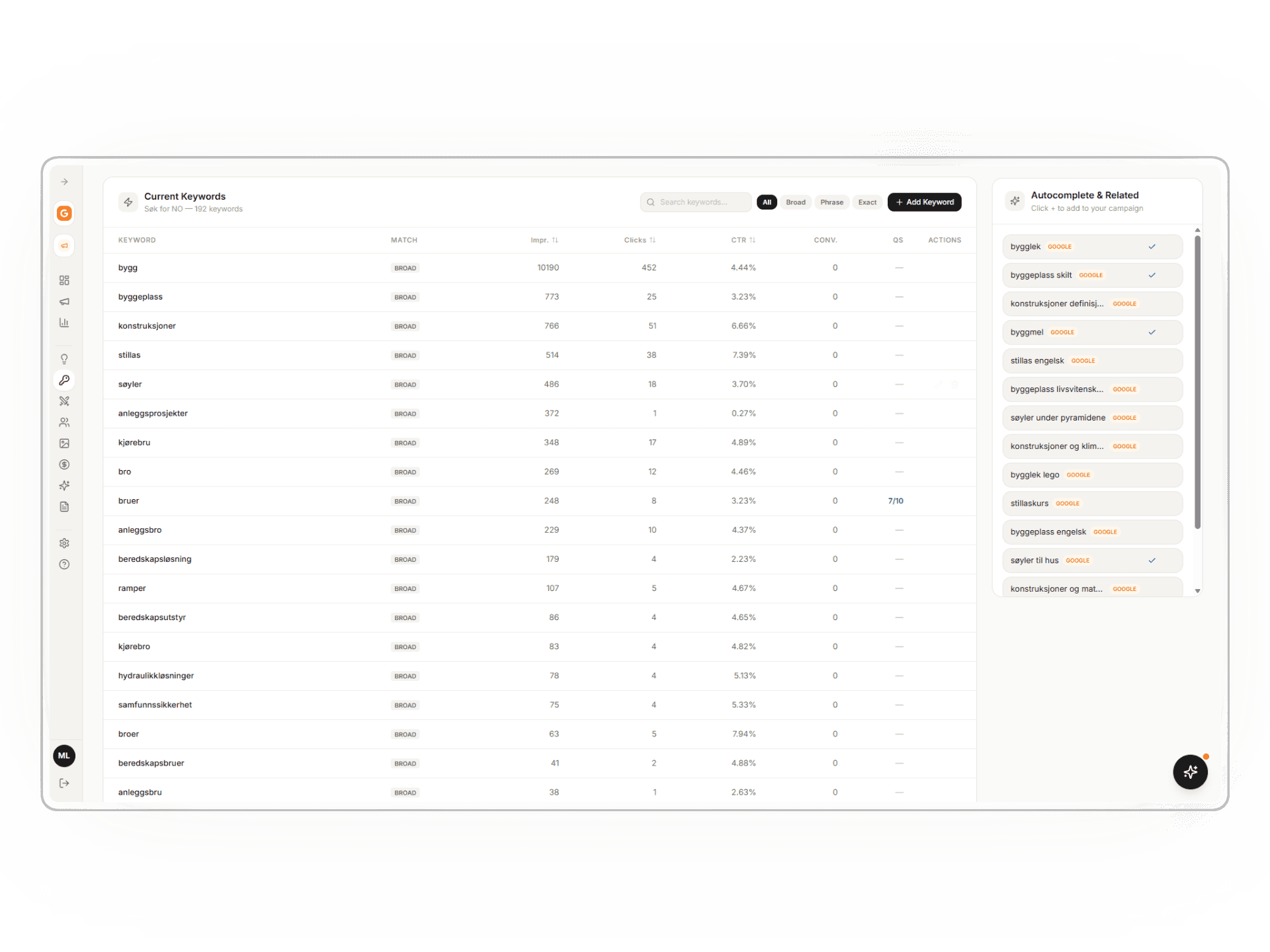
The tool is powered by Google Search data, so you're working with real search behavior. Not estimates or projections. When you open it up, you see your existing campaign keywords laid out clearly with impressions, clicks, click through rate, conversions, and quality score all in one view.
No exporting. No spreadsheets. Everything is right there.
But the real value is in finding new keywords. As you explore, Fillipa surfaces autocomplete and related keyword suggestions pulled straight from Google. These aren't random ideas. They're terms that people are actually searching for, shown alongside your current keywords so you can immediately see where the gaps are.
Say you're running a campaign for a construction company in Norway. You can see that "bygg" is pulling 10,000+ impressions and 452 clicks, while "anleggsprosjekter" has 372 impressions but only 1 click. That tells you something. Maybe the second keyword needs a different ad, maybe it needs to be paused, or maybe there's a better variation hiding in the autocomplete suggestions on the right side of the screen.
That kind of comparison, seeing current performance versus new opportunity, is exactly what's missing from most keyword research workflows.
How Agencies and Freelancers Use This in Practice
We designed Fillipa for people who manage Google Ads campaigns professionally. That usually means agencies, consultants, and freelancers who handle multiple accounts and need to move fast without cutting corners.
Here's what a typical workflow looks like with the Keyword Research tool.
You open a campaign and immediately see how every keyword is performing. You notice a few high impression, low click terms that might need better ad copy or tighter match types. Then you start exploring related keywords using the autocomplete suggestions. You find a handful of long tail terms that your competitors probably aren't bidding on. You add them directly to your campaign from the same screen.
The whole process takes maybe ten minutes. Compare that to the old way of jumping between Keyword Planner, Google Ads, spreadsheets, and maybe a third party SEO tool, and you start to see why people stick with Fillipa once they try it.
What Makes Good Keyword Research Regardless of the Tool
Even with a better tool, keyword research still requires some strategic thinking. Here are the principles that actually matter.
Start with what you already have. Before chasing new keywords, look at the ones already in your campaigns. Which ones are driving conversions? Which ones are eating budget without results? Optimization almost always beats expansion.
Think about intent, not just volume. A keyword with 10,000 monthly searches sounds great until you realize most of those searchers aren't looking to buy anything. Lower volume terms with clear commercial intent often outperform high volume generic ones.
Use match types deliberately. Broad match can uncover new opportunities, but it can also waste money fast if you're not watching the search terms report. Phrase and exact match give you more control. In Fillipa, you can see the match type for every keyword at a glance, which makes this easier to manage.
Pay attention to quality score. Google assigns a quality score to each keyword based on expected click through rate, ad relevance, and landing page experience. A low quality score means you're paying more per click than you should be. Fillipa shows quality scores right in the keyword list, so you can spot problems early.
Don't ignore negative keywords. Every dollar you save by blocking irrelevant searches is a dollar you can spend on terms that actually convert. This is one of the most overlooked parts of keyword management.
The Difference Between Keyword Research and Keyword Management
Most tools treat these as the same thing. They're not.
Keyword research is about discovery. Finding new terms to test and add to your campaigns. Keyword management is about ongoing optimization. Monitoring performance, adjusting bids, pausing underperformers, and refining match types over time.
Fillipa handles both in the same interface. You're not switching between a research tool and your campaign dashboard. The research happens in the context of your live campaign data, which means every decision is grounded in real performance numbers.
This might sound like a small thing, but for anyone who's managed Google Ads campaigns at scale, it's a huge quality of life improvement.
Who Fillipa Is Built For
We're not trying to be everything to everyone. Fillipa is built specifically for agencies, freelancers, and consultants who manage Google Ads campaigns for clients. If that's you, here's what you'll care about.
The keyword research tool uses real Google Search data, not third party estimates. You can see current keyword performance and new opportunities in a single view. Adding keywords to campaigns is fast and happens right in the tool. The interface is clean enough that you don't need a tutorial to figure it out. And AI powered insights help you spot things you might otherwise miss.
If you're a solo business owner running your own ads for the first time, Fillipa will still work for you. But our sweet spot is people who do this professionally and need to do it efficiently across multiple accounts.
Try It Yourself
We could keep talking about keyword research all day, but the best way to understand how Fillipa's tool works is to try it. Take the Keyword Research feature for a spin with one of your campaigns.
You'll probably wonder why you waited so long to stop fighting with spreadsheets.
You might also like